

VLC Skin Editor 0.7
The perfect tool to create and customize skins for your VLC media player
 Download
Program info


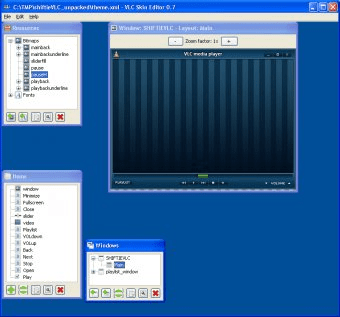
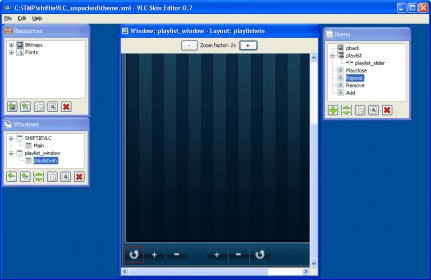

VLC Skin Editor is the perfect tool to design your own skins, or customize already existing ones, to enjoy with one the most popular free media players available. And now you will not need to know anything about XML to do that – its new WYSIWYG approach will allow you to change fonts and colours, move buttons, change text messages, and more, all without touching a single line of code.
Besides, you can preview all those creative changes you have made by opening your VLC player. The VLC Skin Editor lists every single element of a given skin and allows you to change any feature you like. You can easily customize the dimensions of each button, the message to be displayed when you move your mouse over it, the background colours, almost anything! You will not need to add or edit any XML tag; all these changes are made through VLC Skin Editor’s menus and dialogues.
VLC Skin Editor is also a skin creator. You can design your own skins (using external graphics design software) and import all the PNG files into VLC Skin Editor. Then you can edit and add all the functionality you need for your new skin using the program’s easy menus. You can preview and try your skin at any time by uploading it to your VLC media player.
Pros
- WYSIWYG approach to allow any user to edit and create their skins
Cons
- None
Details
Extensions

No information available
The data will be available later.Awards

Related software

Designed to transform Windows 7 to Mac OSX Gold.

OrangeOSX Skin Pack transforms Windows 7 to Mac OSX Orange.

PlacesBar Editor is a small utility to enhance standard Windows menu.
Related stories
See all
We've picked 5 best free solutions for creating, editing, and managing PDFs.
Looking for simple yet efficient (and free) video editing software? Let us give you Clipchamp.

Explore lesser-known AI tools like Adobe Firefly, Freepik, Canva, DreamStudio, and Ideogram for stunning social media imagery.


